
Reviews
Description
Game Introduction
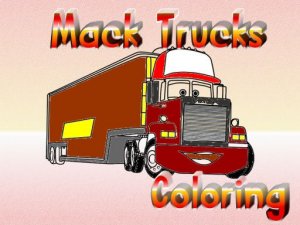
This free online coloring activity invites children and art enthusiasts to explore a collection of twelve truck images. Each picture presents a new opportunity to apply colors and express creativity. The activity focuses on providing a relaxing and enjoyable experience for users of all ages. With a straightforward interface, participants can easily select an image and begin coloring without any complicated steps. The core objective is to complete each truck picture using a variety of colors, making each creation unique. This type of activity is known for its calming effects and ability to improve focus. It is designed to be accessible on any device with an internet connection, requiring no downloads or installations. The activity is completely free, allowing unlimited sessions. Parents appreciate the safe environment, as there are no advertisements or external links that could distract children. The activity encourages artistic exploration and can be a great way for families to spend time together. Whether someone is new to digital art or has experience, this activity offers a welcoming space to practice and have fun.
How to Play
Players begin by choosing one of the available truck images from the main menu. After selecting a picture, a palette of colors appears on the screen. Users click on a color to select it for their brush. A slider or control allows adjustment of the brush size, making it possible to fill large areas quickly or add fine details. If a mistake occurs, an eraser tool can remove unwanted color. Players can switch colors and brush sizes as often as they like during the session. Once the artwork is complete, a save option stores the image on the computer. The controls are designed to be intuitive, so even young children can navigate them without assistance. The entire process relies on simple clicks and selections, making it easy to pick up and play.
Game Features
This free online coloring activity includes twelve distinct truck images to color. It offers a color palette with multiple options and a brush size adjustment tool. An eraser feature allows corrections. Finished artwork can be saved to a computer. The activity is accessible online without any downloads. Its interface is user-friendly and suitable for children and beginners. The activity is completely free to use.
Tips for Success
To get the most enjoyment, start with an image that catches your interest. Try different color combinations to see what looks best. Use a larger brush for big areas and a smaller one for details. If you make a mistake, the eraser tool helps you fix it. Save your work often to keep a record. Most importantly, relax and have fun while creating.
















Player Comments
Sign in to comment
You must be logged in before posting a review or rating.
No account? Create one
No comments yet. Be the first to comment!